Looking for a free AI video generator? We tested several popular AI video creation tools to find out what you can actually create with a free account. Instead of relying on marketing claims, we tested each tool based on AI models, free credits, video quality, supported resolutions, video duration, export options, and overall user experience.
We also looked at how practical each free plan is, including generation speed, feature restrictions, and download limitations. After creating your AI videos, you may need a video converter to adjust formats, resolutions, or file sizes before sharing them on YouTube, social media, or other devices.
Table of Contents
Best Free AI Video Generators at a Glance
Choosing the right AI video generator depends on what you want to create. Some tools specialize in realistic text-to-video generation, while others are designed for avatar videos or social media content. The table below provides a quick overview of the platforms we tested.
| Tool | Best For | Free Plan | Generation Modes | Highlights |
|---|---|---|---|---|
| Kling AI | Cinematic AI videos | 66 free credits | Text-to-Video, Image-to-Video | Realistic video quality and generous free credits |
| Pika | Social media videos | Free credits | Text-to-Video | Easy text-to-video creation for social media |
| HeyGen | Business presentations | 3 free videos | AI Avatar Video | AI avatar videos for business use |
| PixelBin | Flexible AI video creation | 3 free credits (images only) | Multiple modes | Multiple AI video workflows |
| Seedance | Advanced AI workflows | No free credits | Text-to-Video | Multiple AI models in one platform |
Kling AI - Best for Cinematic AI Video Generation
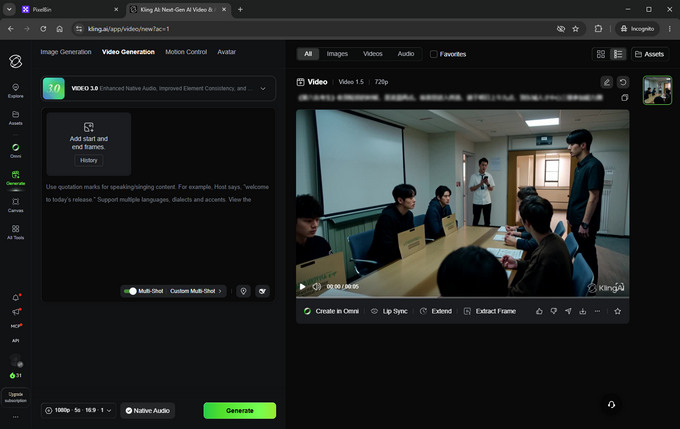
Kling AI delivered some of the strongest results in our testing. It focuses on creating realistic videos with smooth motion, making it suitable for YouTube videos, storytelling, product showcases, advertising, and cinematic content. During our testing, the generated videos looked natural and detailed, especially when using the newer AI models.
New users receive 66 free credits after signing up, which is enough to experience the platform before upgrading. Generation speed was generally good, although free users may need to wait in a queue during busy hours. Videos downloaded with a free account include a watermark, but Kling still offers one of the most generous free experiences among AI video generators.
Here's a summary of Kling AI's main features and free plan.
| Feature | Details |
|---|---|
| Generation Modes | Text-to-Video, Image-to-Video |
| AI Models | Eight AI video models are available. VIDEO 2.6 and VIDEO 3.0 support audio generation, while VIDEO 3.0 also supports up to 4K resolution and videos up to 15 seconds long. |
| Video Settings | Supports 16:9, 9:16, and 1:1 aspect ratios. Most free generations can be exported in 720p or 1080p, and each prompt can generate up to four video variations. |
| Editing Tools | Continue editing generated videos with Lip Sync, Extend, and Extract Frame tools. |
| Free Plan | 66 free credits valid for one month. Free downloads include a watermark and generation may require waiting in a queue. |
Pros
- Excellent visual quality
- Multiple AI models to choose from
- Built-in editing tools after generation
- Generous free credits
Cons
- Watermark on free downloads
- Credits expire after one month
- Queue time during peak usage
Pika - Best for Social Media Content
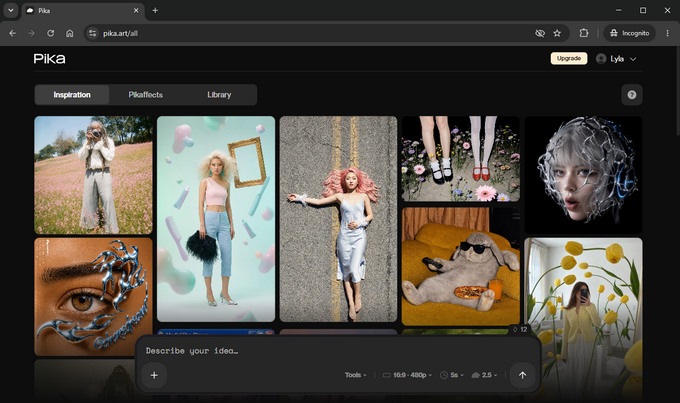
Pika makes AI video creation simple by allowing users to generate videos directly from a text prompt. The platform is designed for creators producing YouTube Shorts, social media videos, TikTok clips, and other short-form content. The interface is clean and beginner-friendly, making it easy to generate videos without adjusting too many settings.
During our testing, Pika free AI video generator produced visually appealing results with smooth animations and creative transitions. However, some scenes occasionally contained unrealistic details, so a second generation or prompt adjustment was sometimes necessary to achieve better results. Video rendering was slower than some competitors, but the platform automatically sends an email notification once generation is complete, allowing users to continue working without waiting on the page.
Another feature we appreciated is the detailed information panel available for every generated video. It displays useful metadata such as resolution, aspect ratio, frame rate, and even the original prompt, making it easier to reproduce or refine previous results.
Here's what you can expect from Pika's free plan.
| Feature | Details |
|---|---|
| Generation Mode | Text-to-Video generation using natural language prompts. |
| Resolution | Supports 480p, 720p, and 1080p output. Free credits are limited to generating 480p videos. |
| Video Duration | 5-second and 10-second video generation. |
| Aspect Ratios | Presets for Cinematic (5:2), YouTube (16:9), Twitter (4:3), Instagram Post (1:1), Portrait (4:5), and Instagram Stories (9:16). |
| Free Plan | Free credits can generate 480p videos. Downloads include a watermark. |
| Additional Features | Displays video metadata, including prompt, FPS, resolution, and aspect ratio after generation. |
Pros
- Very easy for beginners
- Creative visual results
- Social media aspect ratio presets
- Useful generation information for each video
Cons
- Free exports are limited to 480p
- Watermark on downloaded videos
- Longer rendering time
HeyGen - Best for Business Presentations and Training Videos
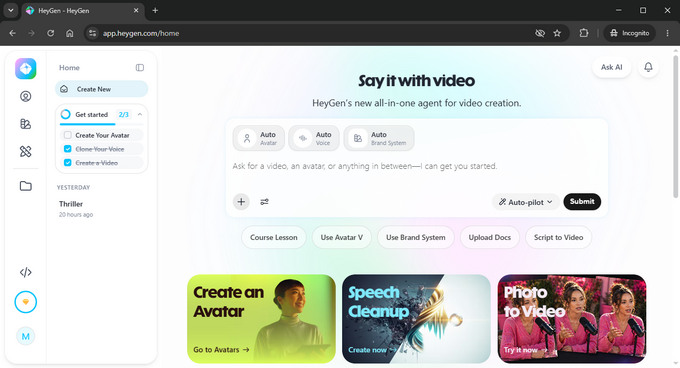
Unlike traditional AI video generators that focus on cinematic scenes or animated visuals, HeyGen specializes in AI avatar videos. It is designed for businesses, educators, marketers, and content creators who need professional-looking presenters without recording themselves on camera.
Creating a video in HeyGen is different from most AI video tools. Users can customize avatars, voices, brand elements, instructions, and supporting materials before generation. The platform also includes an Auto-Pilot mode that automatically creates videos from your input, as well as a Chat mode that helps plan and organize video content through conversation.
During our testing, generating a short five-second video took around four minutes. The resulting video was optimized for vertical viewing on mobile devices, making it suitable for social media content. We also noticed that AI-generated thumbnails and video content occasionally missed small details, so reviewing and editing the final result before publishing is recommended.
Here's an overview of HeyGen's AI video creation features.
| Feature | Details |
|---|---|
| Video Type | AI avatar videos with customizable presenters and voices. |
| Customization | Supports custom avatars, AI voices, brand settings, instructions, and file attachments. |
| Creation Modes | Auto-Pilot for automatic generation and Chat mode for planning and creating videos. |
| Video Output | Primarily optimized for vertical mobile-friendly videos. |
| Performance | A 5-second AI video typically takes several minutes to generate. |
| Free Plan | New users can create three free videos. Downloading generated videos requires a paid upgrade. |
Pros
- Excellent AI avatar quality
- Rich customization options
- Auto video creation tools
Cons
- Downloading requires an upgrade
- Generation is relatively slow
- Some AI-generated content needs refinement
PixelBin - Best for Flexible AI Video Creation
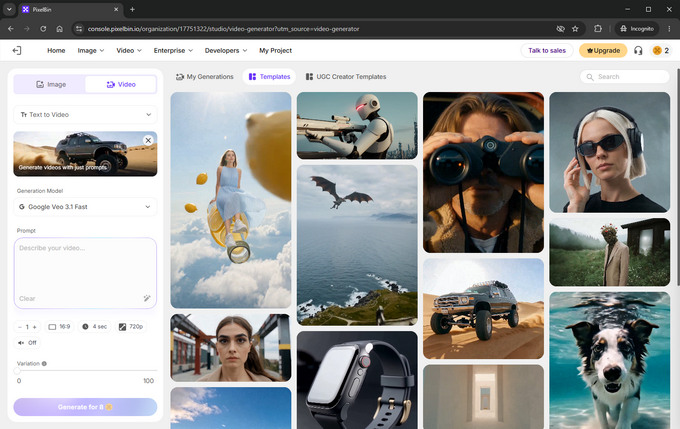
PixelBin offers a different experience from most AI video generators. Instead of focusing on a single AI model, it provides several video generation modes and multiple AI models, allowing creators to experiment with different styles and workflows within one platform.
One thing we noticed during testing is that registering an account provides three free credits, but those credits can only be used for AI image generation rather than video creation. Although some video models require as few as two credits per generation, switching between certain premium models is only available with a paid subscription.
PixelBin is better suited for users who want to explore advanced AI video workflows and are willing to purchase credits for video generation.
Below are the main features available on PixelBin.
| Feature | Details |
|---|---|
| Generation Modes | Text-to-Video, Image-to-Video, Motion Control, and Reference-to-Video. |
| AI Models | Multiple AI models are available, each offering different capabilities, supported resolutions, and pricing. Premium model switching requires a paid account. |
| Video Settings | Supports multiple aspect ratios including 16:9, 9:16, 1:1, 3:4, and 4:3. Depending on the selected model, video duration ranges from 2 to 20 seconds, while resolution ranges from 360p up to 2160p. |
| Credits | Video generation costs vary significantly by model, ranging from approximately 2 to 450 credits per video. |
| Free Plan | New users receive three free credits for image generation only. Video generation requires paid credits. |
Pros
- Four AI generation modes
- Flexible output settings
- Supports high-resolution video generation
Cons
- Free credits can't be used for video generation
- Premium models require a paid subscription
Seedance - Best for Advanced AI Video Workflows
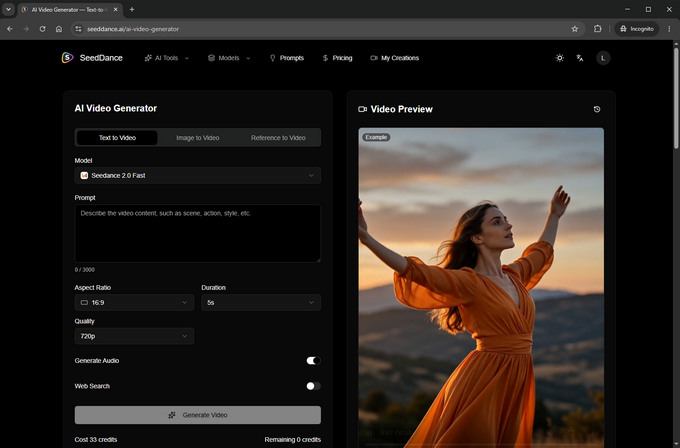
Seedance is an AI video generation platform designed for users who want to experiment with different AI models without switching between multiple websites. Rather than relying on a single proprietary model, it integrates several well-known AI engines into one interface, making it easier to compare their output and choose the one that best fits your project.
Unlike many online AI video generators that calculate credits based on video length or resolution, Seedance uses a simpler pricing model. During our testing, we found that credit consumption depends primarily on the selected AI model rather than the video's aspect ratio, duration, resolution, or whether audio is enabled. This makes it much easier to estimate the cost of each generation before you start.
Although new users don't receive free credits, Seedance offers one of the most flexible sets of generation options among the tools we tested, making it a strong option for creators who want more control over AI model selection and output settings.
The following table summarizes Seedance's current capabilities.
| Feature | Details |
|---|---|
| AI Models | Supports multiple AI models, including Seedance, HappyHorse, Kling, Grok, Veo, and Gemini. |
| Video Settings | Aspect ratios include 16:9, 9:16, 1:1, 4:3, 3:4, and 21:9. Video duration ranges from 4 to 15 seconds with resolutions from 480p up to 4K. |
| Audio | Users can choose whether to generate audio together with the video. |
| Credit System | Credit consumption depends on the selected AI model instead of video duration, quality, aspect ratio, or audio settings. |
| Free Plan | Registration does not include free credits for video generation. |
Pros
- Access to several leading AI models
- Supports up to 4K output
- Flexible aspect ratio and resolution options
Cons
- No free credits
- Paid credits are required to generate videos
Convert AI Generated Videos for YouTube and Social Media
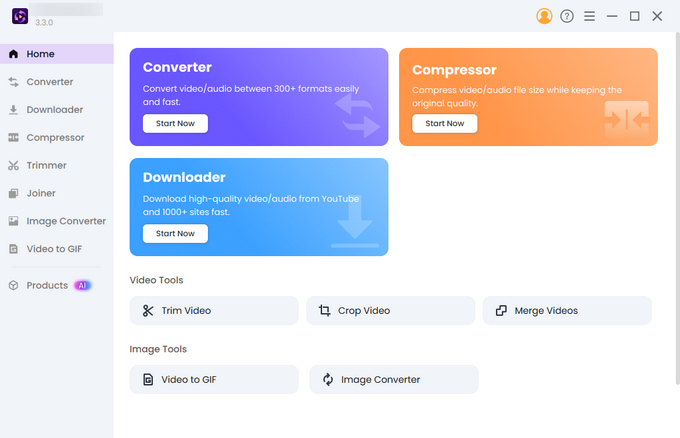
AI-generated videos are not always ready to upload directly. Different platforms have different requirements for video formats, aspect ratios, and file sizes. Before publishing AI videos on YouTube, Instagram, TikTok, or other platforms, you may need to convert, resize, or compress the files.
Hicoo Video Converter helps prepare AI-generated videos for sharing with fast local processing and flexible output settings. It supports multiple video formats and allows you to adjust resolution, quality, and other settings based on where you plan to publish your content.
Key Features
- √ Convert AI-generated videos to 13 popular formats, including MP4, MOV, AVI, MKV, and WebM
- √ Resize, crop, trim, merge, and compress videos for different platforms
- √ Customize output resolution and video quality before exporting
- √ Optimize videos for YouTube, Instagram, TikTok, websites, and mobile devices
- √ Adjust advanced audio and video settings for more control over the final output
Whether you need to prepare a YouTube video, resize a social media clip, or reduce a large AI-generated file, Hicoo Video Converter provides a simple way to optimize your videos before sharing.
Frequently Asked Questions
1. Is there a completely free AI video generator?
Most AI video generators are not completely free. The platforms we tested either use credits, limit free generations, or restrict certain features. Kling AI offers 66 free credits, HeyGen provides three free videos, and Pika offers free credits for testing. However, unlimited AI video generation usually requires a paid plan.
2. Can I use a free AI video generator without login?
No. All AI video generators we tested require users to create an account before generating videos. However, signing up is usually free and gives you access to benefits such as free credits, saved projects, generation history, and additional editing features.
3. Which free AI video generator is best for text-to-video?
Kling AI is one of the best options for free text-to-video generation because it produces realistic results and offers multiple AI models. Pika is also a good choice for beginners who want a simple prompt-based workflow, especially for creating short social media videos.
4. Which YouTube video generator is best for beginners?
Kling AI is one of the best YouTube video generators we tested, especially for creators who need realistic, cinematic videos. Pika is another good option for shorter YouTube content and social media-style videos. Both tools support different aspect ratios, making it easier to create videos for different YouTube formats.
Conclusion
After testing these free AI video generators, Kling AI is our top choice for realistic AI videos, while Pika is a great option for beginners and social media creators. If you need to prepare AI-generated videos for publishing, Hicoo Video Converter can help convert, resize, and optimize your files for different platforms and devices.