How to Convert SVG to PNG in 3 Steps
- Upload Your SVG File
- Choose PNG as the Output Format
- Convert and Save Your PNG
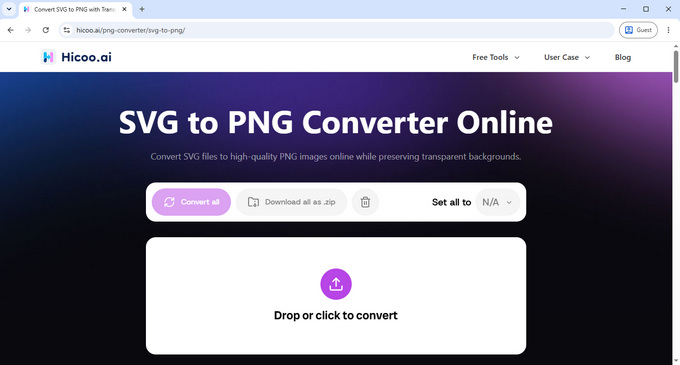
Upload the SVG image you want to convert. You can upload multiple SVG files at once for batch conversion.
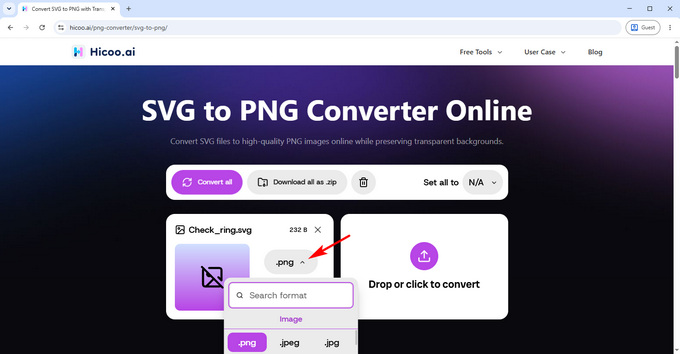
Select PNG as the output format. Your files are processed locally in your browser, so they don't need to be uploaded to a remote server.
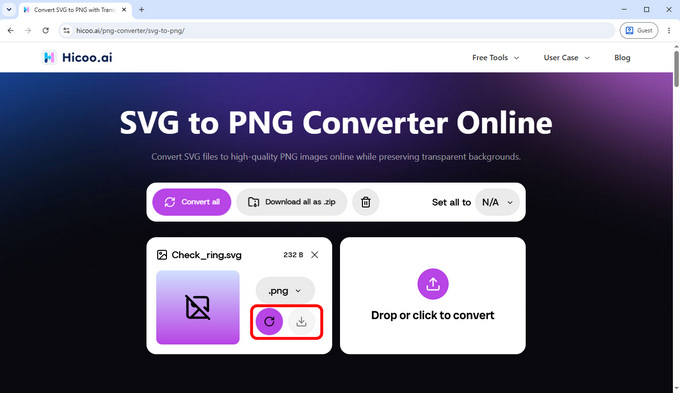
Start the conversion and save your PNG files when they're ready. The converted images are downloaded without watermarks.
Formats Explained
SVG (Scalable Vector Graphics)
A vector image format commonly used for logos, icons, illustrations, and other scalable graphics.
PNG (Portable Network Graphics)
A raster image format that supports transparency and is widely supported by apps, websites, and image editors.
What Happens When You Convert SVG to PNG?
SVG Becomes a Raster Image
SVG is a vector format that can scale without losing sharpness. PNG is a raster format made up of pixels. When you convert SVG to PNG, the resulting image has fixed pixel dimensions.
Transparency Can Be Preserved
PNG supports transparency, so transparent areas in an SVG can be preserved when converted to PNG. This makes PNG useful for logos, icons, overlays, and other graphics that need a transparent background.
Choose the Right Output Size
Because PNG uses fixed pixel dimensions, the output size matters. Your converted PNG keeps the original SVG's dimensions, so consider the image's intended use before converting.
Tip: Keep the original SVG if you may need to resize or edit the graphic later. SVG remains scalable, while the converted PNG has fixed dimensions.
FAQ
1. Does converting SVG to PNG reduce image quality?
No. Converting SVG to PNG does not inherently reduce image quality. The PNG keeps the original dimensions, but unlike SVG, it may appear pixelated if you enlarge it significantly.
2. Can PNG keep the transparent background from an SVG?
Yes. PNG supports transparency, so transparent areas in an SVG can be preserved when converted to PNG.
3. Is PNG better than SVG?
It depends on how you plan to use the image. SVG is better for scalable graphics, while PNG is useful when you need a widely supported image with fixed dimensions and transparency.