Convert YouTube to WAV Step by Step
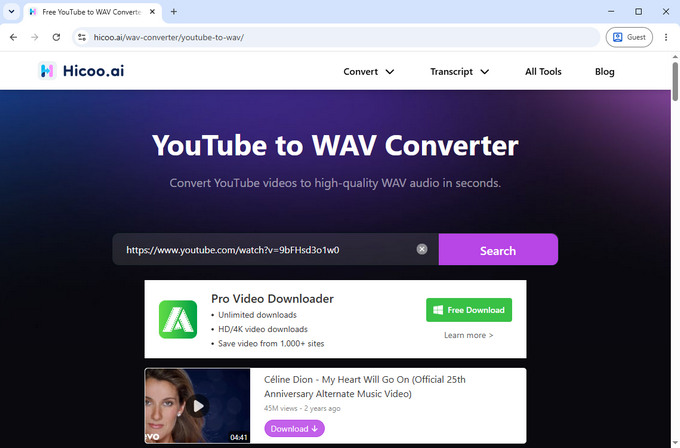
- Paste the YouTube URL
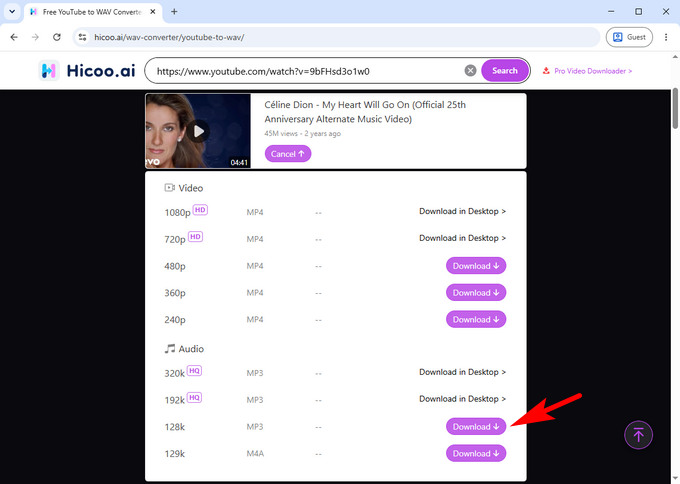
- Convert YouTube Video to MP3
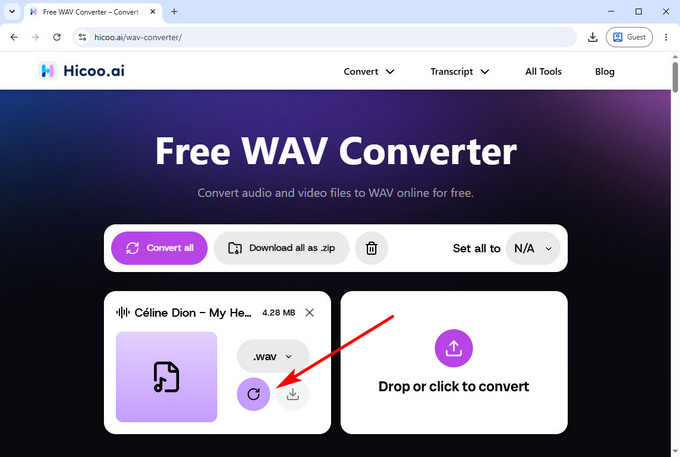
- Convert MP3 to WAV
Copy the YouTube video URL and paste it into the YouTube to MP3 Converter. The tool will analyze the video and prepare it for MP3 conversion.
The YouTube to MP3 Converter extracts the audio track and converts it into an MP3 file. Once completed, you can use the MP3 file for WAV conversion or other audio projects.
Upload the MP3 file to the WAV Converter. Select WAV as the output format and start the conversion. Your audio will be converted into a high-quality WAV file for editing, playback, and other audio projects.
Convert YouTube Audio in Bulk with Pro Converter
Need to process multiple audio files or larger projects? Hicoo Premium Converter lets you convert files and URLs in batches with faster desktop processing.
FAQ
1. Can I convert YouTube videos to WAV directly?
Yes. You can convert YouTube videos to WAV by first converting the video into an audio file and then changing the format to WAV.
2. Why do I need to convert YouTube to MP3 before WAV?
MP3 is used as an intermediate audio format that makes the conversion workflow easier. You can convert the extracted audio file into WAV using an audio converter.