How to Extract Audio from Video Step by Step
- Upload Your Video File
- Choose Format and Extract
- Download Your Audio File
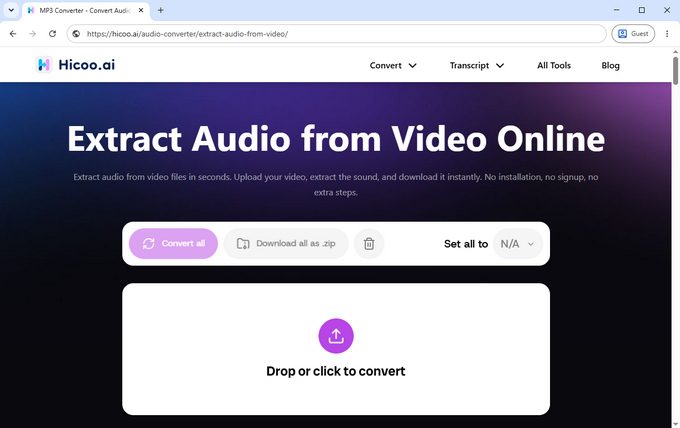
Upload or drag and drop your video file (MP4, MOV, MKV, AVI, WEBM and more). Supports files up to 100MB, with batch processing for up to 3 videos.
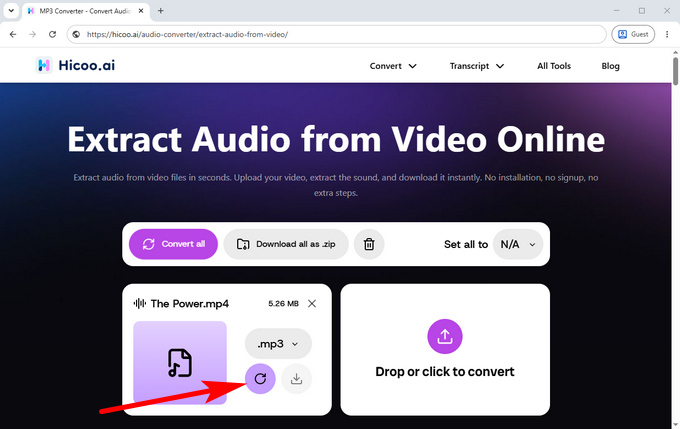
Select your output format (MP3, WAV, AAC, or FLAC) and click the icon to start extraction. The tool processes everything locally in your browser.
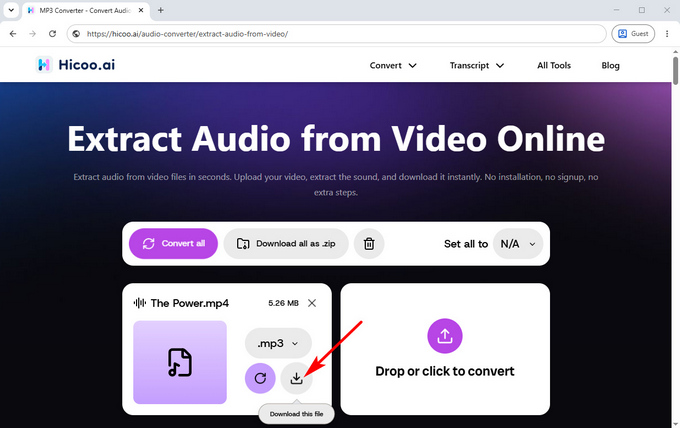
Once processing is complete, download your extracted audio instantly.
Supported Formats
Input (Video Files):
MP4, MOV, MKV, AVI, WEBM and more
Output (Audio Files):
MP3, WAV, AAC, FLAC and more
Best Audio Format for Your Needs
| Format | Best For | When to Use |
|---|---|---|
| MP3 | General use | Play anywhere, high compatibility |
| WAV | Editing | Audio production or editing workflows |
| AAC | Streaming | Smaller size with good quality |
| FLAC | Archiving | Lossless quality preservation |
Need to Process Larger Video Files?
If your video files are too large or you need more control over output settings, the online audio extractor may not be enough. In these cases, you can switch to Hicoo Premium Converter to handle long recordings, batch conversion, and advanced editing more efficiently, with full offline processing and no file size limitations.
Frequently Asked Questions
1. Is it safe to use this audio extractor?
Yes. The tool runs entirely in your browser using local processing. Your files are never uploaded to a server or stored.
2. What file size is supported?
You can extract audio from video files up to 100MB. Most files are processed within seconds.
3. What formats can I export?
You can export audio in MP3, WAV, AAC, or FLAC depending on your needs.
4. Can I use this tool on mobile?
Yes, it works on all modern mobile and desktop browsers with no installation required.
5. Do I need to install any software?
No. Everything runs directly in your browser.