How to Convert Video to MP3 Step by Step
- Import Your Video Files
- Convert to MP3
- Download MP3 files
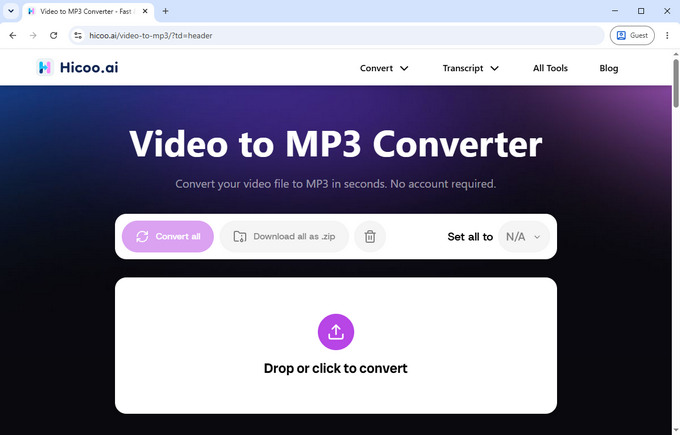
Drag and drop your videos or select files manually. Supports up to 3 files at once and 100MB per file. All processing runs locally in your browser, with no server uploads.
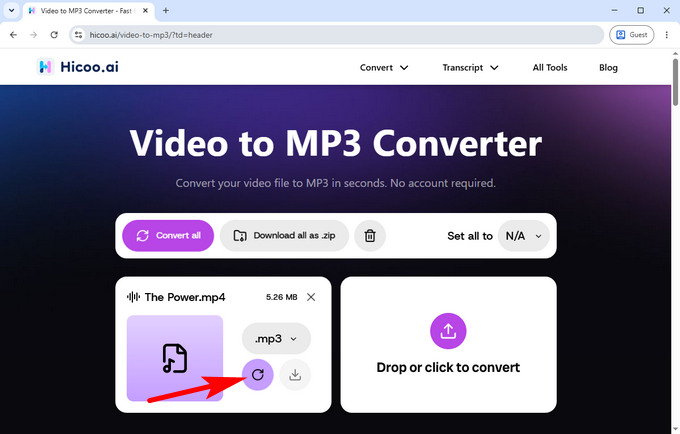
Click convert to instantly extract audio in MP3 format. The process is fast, fully in-browser, and contains no ads or interruptions.
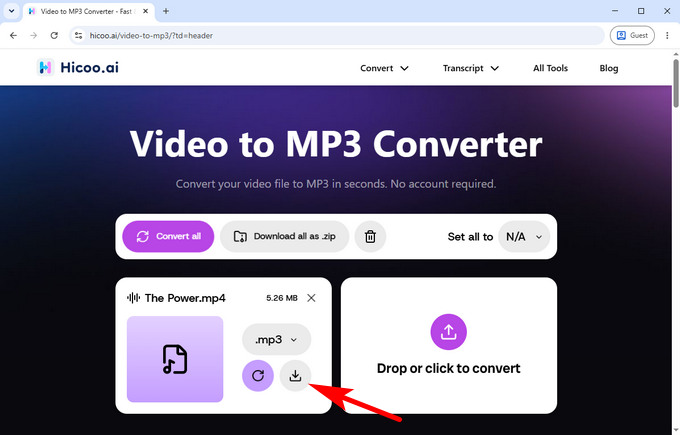
Download your converted MP3 files directly to your device. Files are generated locally for fast, secure, and private processing.
Supported Formats
Input (Video Files):
MP4, MOV, MKV, AVI, WEBM and more
Output (Audio Files):
MP3, WAV, AAC, FLAC and more
Convert Large Videos in Seconds
Online conversion supports files up to 100MB per file with fast browser-based processing. For larger files or advanced workflows, you can use Hicoo Premium Converter.
FAQ
1. Is it safe to convert video to MP3 online?
Yes. All processing happens directly in your browser using local processing. Your files are not uploaded to any server, ensuring full privacy and security.
2. What is the maximum file size supported?
You can convert video files up to 100MB per file, directly in your browser with fast local processing. For larger files, you can use the Premium Converter, which supports bigger video sizes and advanced processing capabilities.
3. Is this tool free to use?
Yes. The video to MP3 converter is completely free to use online with no installation required.